Difference between revisions of "U-Boot on Orange Pi 4"
Jump to navigation
Jump to search
| Line 22: | Line 22: | ||
# boot.img | # boot.img | ||
# rootfs.img | # rootfs.img | ||
| − | |||
| − | |||
| − | |||
| − | |||
| − | |||
| − | |||
== Setup == | == Setup == | ||
| Line 35: | Line 29: | ||
=== Option 1: Package the image with Rockchip miniloader === | === Option 1: Package the image with Rockchip miniloader === | ||
| − | + | {{Warning|Option 1 (recommended by [[Rockchip]]) uses closed source tools and binaries. | |
| − | |||
| − | + | [https://github.com/rockchip-linux/rkbin.git rkbin/tools] are pre-built x86 binaries and are therefore not usable on the target device. The source code is not available for audit or compilation on a different architecture. | |
| − | |||
| − | |||
| − | + | Therefore this is not a usable route.}} | |
| + | See [https://gitlab.denx.de/u-boot/u-boot/-/blob/master/doc/README.rockchip gitlab.denx.de/.../README.rockchip] for instructions. | ||
| − | + | === Option 2: Package the image with SPL === | |
| − | |||
| − | |||
| − | |||
| − | |||
| − | |||
| − | |||
| − | |||
| − | + | ==== Export cross compiler for AArch64 ==== | |
| − | + | Export cross compiler path for aarch64 | |
| − | |||
| − | |||
| − | |||
| − | + | (needed only when not running on the target device) | |
| + | ==== Compile ATF ==== | ||
<pre> | <pre> | ||
| − | |||
| − | |||
| − | |||
| − | |||
=> git clone https://github.com/ARM-software/arm-trusted-firmware.git | => git clone https://github.com/ARM-software/arm-trusted-firmware.git | ||
=> cd arm-trusted-firmware | => cd arm-trusted-firmware | ||
| Line 75: | Line 54: | ||
(export bl31.elf) | (export bl31.elf) | ||
=> export BL31=/path/to/arm-trusted-firmware/build/rk3399/release/bl31/bl31.elf | => export BL31=/path/to/arm-trusted-firmware/build/rk3399/release/bl31/bl31.elf | ||
| + | </pre> | ||
| − | + | ==== Compile PMU M0 firmware ==== | |
| − | + | <pre> | |
This is optional for most of the rk3399 boards and required only for Puma board. | This is optional for most of the rk3399 boards and required only for Puma board. | ||
| Line 88: | Line 68: | ||
(export rk3399m0.bin) | (export rk3399m0.bin) | ||
=> export PMUM0=/path/to/rk3399-cortex-m0/rk3399m0.bin | => export PMUM0=/path/to/rk3399-cortex-m0/rk3399m0.bin | ||
| + | </pre> | ||
| − | + | ==== Compile U-Boot ==== | |
| − | + | <pre> | |
=> cd /path/to/u-boot | => cd /path/to/u-boot | ||
=> make orangepi-rk3399_defconfig | => make orangepi-rk3399_defconfig | ||
Revision as of 21:26, 24 March 2020
U-Boot used on an Orange Pi 4 which sports an RK3399 processor.
TODO: THIS!
Contents
Introduction

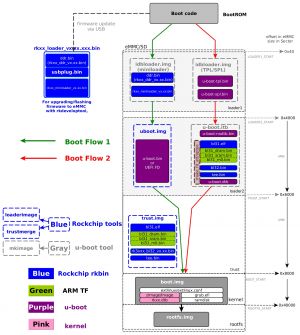
Rockchip boot flow. Source: [1]
See U-Boot for general concepts and definitions.
See ARM Trusted Firmware for ATF / trust related terminology.
Boot Sequence
Rockchip-specific booting is described here: [2]
- Loader 1:
- option 1: miniloader
- option 2: SPL/TPL
- Loader 2:
- option 1: uboot.img
- option 2: u-boot.itb
- trust.img
- boot.img
- rootfs.img
Setup
git clone https://gitlab.denx.de/u-boot/u-boot.git
cd u-boot
make orangepi-rk3399_defconfig
Option 1: Package the image with Rockchip miniloader
(!) Option 1 (recommended by Rockchip) uses closed source tools and binaries.
rkbin/tools are pre-built x86 binaries and are therefore not usable on the target device. The source code is not available for audit or compilation on a different architecture.
Therefore this is not a usable route.
See gitlab.denx.de/.../README.rockchip for instructions.
Option 2: Package the image with SPL
Export cross compiler for AArch64
Export cross compiler path for aarch64
(needed only when not running on the target device)
Compile ATF
	=> git clone https://github.com/ARM-software/arm-trusted-firmware.git
	=> cd arm-trusted-firmware

	(export cross compiler path for Cortex-M0 MCU likely arm-none-eabi-)
	=> make realclean
	=> make CROSS_COMPILE=aarch64-linux-gnu- PLAT=rk3399

	(export bl31.elf)
	=> export BL31=/path/to/arm-trusted-firmware/build/rk3399/release/bl31/bl31.elf
Compile PMU M0 firmware
     This is optional for most of the rk3399 boards and required only for Puma board.

     => git clone git://git.theobroma-systems.com/rk3399-cortex-m0.git
     => cd rk3399-cortex-m0

     (export cross compiler path for Cortex-M0 PMU)
     => make CROSS_COMPILE=arm-cortex_m0-eabi-

     (export rk3399m0.bin)
     => export PMUM0=/path/to/rk3399-cortex-m0/rk3399m0.bin
Compile U-Boot
     => cd /path/to/u-boot
     => make orangepi-rk3399_defconfig
     => make

     (Get spl/u-boot-spl-dtb.bin, u-boot.itb images and some boards would get
      spl/u-boot-spl.bin since it doesn't enable CONFIG_SPL_OF_CONTROL

      If TPL enabled on the target, get tpl/u-boot-tpl-dtb.bin or tpl/u-boot-tpl.bin
      if CONFIG_TPL_OF_CONTROL not enabled)
Source: README.rockchip
Building
make all
Booting from an SD card on RK3399
To write an image that boots from an SD card (assumed to be /dev/sdc):

Option 1: Package the image with Rockchip miniloader:

  - Create idbloader.img

    => cd /path/to/u-boot
    => ./tools/mkimage  -n rk3399 -T rksd -d /path/to/rkbin/bin/rk33/rk3399_ddr_800MHz_v1.20.bin idbloader.img
    => cat /path/to/rkbin/bin/rk33/rk3399_miniloader_v1.19.bin >> idbloader.img

  - Write idbloader.img at 64 sector

    => sudo dd if=idbloader.img of=/dev/sdc seek=64

  - Write trust.img at 24576

    => sudo dd if=trust.img of=/dev/sdc seek=24576

  - Write uboot.img at 16384 sector

    => sudo dd if=uboot.img of=/dev/sdc seek=16384
    => sync

Put this SD (or micro-SD) card into your board and reset it. You should see
something like:

DDR Version 1.20 20190314
In
Channel 0: DDR3, 933MHz
Bus Width=32 Col=10 Bank=8 Row=15 CS=1 Die Bus-Width=16 Size=1024MB
no stride
ch 0 ddrconfig = 0x101, ddrsize = 0x20
pmugrf_os_reg[2] = 0x10006281, stride = 0x17
OUT
Boot1: 2019-03-14, version: 1.19
CPUId = 0x0
ChipType = 0x10, 239
mmc: ERROR: SDHCI ERR:cmd:0x102,stat:0x18000
mmc: ERROR: Card did not respond to voltage select!
emmc reinit
mmc: ERROR: SDHCI ERR:cmd:0x102,stat:0x18000
mmc: ERROR: Card did not respond to voltage select!
emmc reinit
mmc: ERROR: SDHCI ERR:cmd:0x102,stat:0x18000
mmc: ERROR: Card did not respond to voltage select!
SdmmcInit=2 1
mmc0:cmd5,20
SdmmcInit=0 0
BootCapSize=0
UserCapSize=60543MB
FwPartOffset=2000 , 0
StorageInit ok = 45266
SecureMode = 0
SecureInit read PBA: 0x4
SecureInit read PBA: 0x404
SecureInit read PBA: 0x804
SecureInit read PBA: 0xc04
SecureInit read PBA: 0x1004
SecureInit read PBA: 0x1404
SecureInit read PBA: 0x1804
SecureInit read PBA: 0x1c04
SecureInit ret = 0, SecureMode = 0
atags_set_bootdev: ret:(0)
GPT 0x3380ec0 signature is wrong
recovery gpt...
GPT 0x3380ec0 signature is wrong
recovery gpt fail!
LoadTrust Addr:0x4000
No find bl30.bin
Load uboot, ReadLba = 2000
hdr 0000000003380880 + 0x0:0x88,0x41,0x3e,0x97,0xe6,0x61,0x54,0x23,0xe9,0x5a,0xd1,0x2b,0xdc,0x2f,0xf9,0x35,

Load OK, addr=0x200000, size=0x9c9c0
RunBL31 0x10000
NOTICE:  BL31: v1.3(debug):370ab80
NOTICE:  BL31: Built : 09:23:41, Mar  4 2019
NOTICE:  BL31: Rockchip release version: v1.1
INFO:    GICv3 with legacy support detected. ARM GICV3 driver initialized in EL3
INFO:    Using opteed sec cpu_context!
INFO:    boot cpu mask: 0
INFO:    plat_rockchip_pmu_init(1181): pd status 3e
INFO:    BL31: Initializing runtime services
INFO:    BL31: Initializing BL32
INF [0x0] TEE-CORE:init_primary_helper:337: Initializing (1.1.0-195-g8f090d20 #6 Fri Dec  7 06:11:20 UTC 2018 aarch64)

INF [0x0] TEE-CORE:init_primary_helper:338: Release version: 1.2

INF [0x0] TEE-CORE:init_teecore:83: teecore inits done
INFO:    BL31: Preparing for EL3 exit to normal world
INFO:    Entry point address = 0x200000
INFO:    SPSR = 0x3c9


U-Boot 2019.04-rc4-00136-gfd121f9641-dirty (Apr 16 2019 - 14:02:47 +0530)

Model: FriendlyARM NanoPi NEO4
DRAM:  1022 MiB
MMC:   dwmmc@fe310000: 2, dwmmc@fe320000: 1, sdhci@fe330000: 0
Loading Environment from MMC... *** Warning - bad CRC, using default environment

In:    serial@ff1a0000
Out:   serial@ff1a0000
Err:   serial@ff1a0000
Model: FriendlyARM NanoPi NEO4
Net:   eth0: ethernet@fe300000
Hit any key to stop autoboot:  0
=>

Option 2: Package the image with SPL:

  - Prefix rk3399 header to SPL image

    => cd /path/to/u-boot
    => ./tools/mkimage -n rk3399 -T rksd -d spl/u-boot-spl-dtb.bin out

  - Write prefixed SPL at 64th sector

    => sudo dd if=out of=/dev/sdc seek=64

  - Write U-Boot proper at 16384 sector

    => sudo dd if=u-boot.itb of=/dev/sdc seek=16384
    => sync

Put this SD (or micro-SD) card into your board and reset it. You should see
something like:

U-Boot SPL board init
Trying to boot from MMC1


U-Boot 2019.01-00004-g14db5ee998 (Mar 11 2019 - 13:18:41 +0530)

Model: Orange Pi RK3399 Board
DRAM:  2 GiB
MMC:   dwmmc@fe310000: 2, dwmmc@fe320000: 1, sdhci@fe330000: 0
Loading Environment from MMC... OK
In:    serial@ff1a0000
Out:   serial@ff1a0000
Err:   serial@ff1a0000
Model: Orange Pi RK3399 Board
Net:   eth0: ethernet@fe300000
Hit any key to stop autoboot:  0
=>

Option 3: Package the image with TPL:

  - Write tpl+spl at 64th sector

    => sudo dd if=idbloader.img of=/dev/sdc seek=64

  - Write U-Boot proper at 16384 sector

    => sudo dd if=u-boot.itb of=/dev/sdc seek=16384
    => sync

Put this SD (or micro-SD) card into your board and reset it. You should see
something like:

U-Boot TPL board init
Trying to boot from BOOTROM
Returning to boot ROM...

U-Boot SPL board init
Trying to boot from MMC1


U-Boot 2019.07-rc1-00241-g5b3244767a (May 08 2019 - 10:51:06 +0530)

Model: Orange Pi RK3399 Board
DRAM:  2 GiB
MMC:   dwmmc@fe310000: 2, dwmmc@fe320000: 1, sdhci@fe330000: 0
Loading Environment from MMC... OK
In:    serial@ff1a0000
Out:   serial@ff1a0000
Err:   serial@ff1a0000
Model: Orange Pi RK3399 Board
Net:   eth0: ethernet@fe300000
Hit any key to stop autoboot:  0
=>
Source: README.rockchip
Related
- ATF = ARM Trusted Firmware
External Links
- Main resource: gitlab.denx.de/.../README.rockchip
- Rockchip ATF wiki: [3]
- ATF repository: [4]


![[1]](http://opensource.rock-chips.com/wiki_File:Rockchip_bootflow20181122.jpg)